

CDS Accounts in Malaysia: What They Are and How They Work
Learn how a CDS account in Malaysia holds Bursa-listed securities, how direct and nominee accounts differ, and what documents and fees to expect.

Stop guessing and start profiting. This guide reveals the Top MT4 Indicators for 2026, verified as non-repainting and stress-tested for live market conditions. Discover their ideal timeframes, key pros/cons, and a critical guide to choosing the best tool for your Forex strategy. Includes safe download and installation steps.
Below is a list of our Top-Tier Selections. These represent the highest standard available in the Malaysian forex market.
GBPUSD, XAUUSD (Gold), EURUSD
No Repaint (Verified)
Free / Paid versions available
H1, H4, Daily
Yes (Popup, Push)
Medium
Automates Smart Money Concepts (SMC) analysis. Instead of guessing, it shows exactly where institutions have resting orders.
A custom script that identifies and draws rectangular zones where price previously reacted aggressively, indicating institutional supply or demand.
Performance Note: Zones are probability areas, not concrete walls. Wait for price action confirmation inside the zone before entering.
All Major Pairs (EURUSD, USDJPY)
No Repaint
Free (Built-in or Custom)
H4, Daily
No (Unless Custom)
Medium
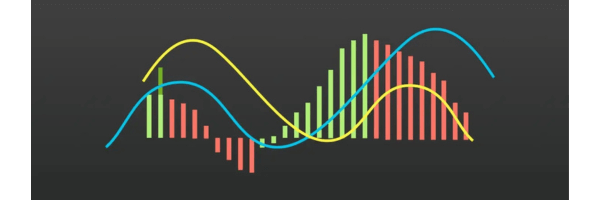
The most reliable tool for spotting trend reversals and momentum shifts before price moves. Essential for divergence trading.
A trend-following momentum indicator that shows the relationship between two moving averages of a security’s price.
Performance Note: Avoid taking signals when the MACD lines are flat (near the zero line); this indicates a ranging market with no clear trend.
Volatile Pairs (GBPJPY, Indices)
No Repaint
Free (Built-in)
M15, H1
No
Low
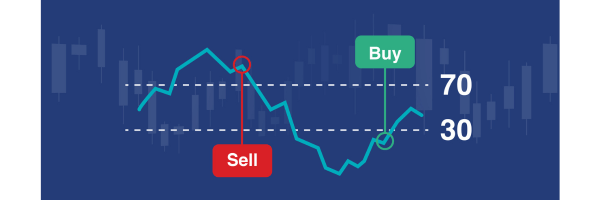
The standard for identifying overextended prices. It prevents you from buying at the top or selling at the bottom.
A momentum oscillator that measures the speed and change of price movements to identify overbought or oversold conditions.
Performance Note: In a strong uptrend, ignore “Overbought” signals. Instead, look for “Oversold” dips (RSI 40-50) to join the trend.
EURUSD, GBPUSD, JPY Pairs
No Repaint
Free (Download)
M15, H1, H4
No
Medium
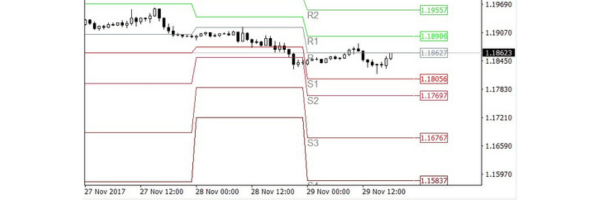
Provides objective, mathematical support and resistance levels that do not change during the trading day. Day traders rely on these globally.
Draws automatic horizontal lines (S1, S2, R1, R2) based on the previous day’s High, Low, and Close prices.
Performance Note: Price often “magnets” to the Central Pivot Point (P) mid-day. Use R1/S1 as primary profit targets for intraday scalps.
Ranging Pairs (EURCHF, AUDNZD)
No Repaint
Free (Built-in)
M5, H1
No
Low
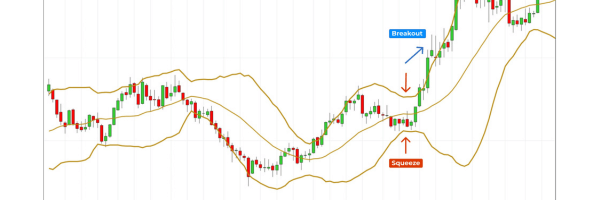
The best visual aid for volatility. It helps you see when the market is “squeezing” (preparing for a move) or overextended.
Consists of a middle SMA and two outer bands (standard deviations). Bands expand/contract based on volatility.
Performance Note: Do not trade solely on a touch of the outer band. Wait for a candlestick reversal pattern (e.g., Pin Bar) to confirm rejection.
Trending Pairs (USDJPY, Trends)
No Repaint (Check Version)
Free (Download)
H1, H4
Yes (Color Change)
Low
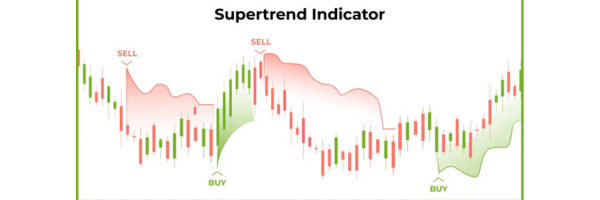
The easiest “Green = Buy, Red = Sell” filter. Perfect for beginners who struggle with holding trades or setting trailing stops.
A trend-following overlay that changes color based on price movement and ATR (volatility). Green signals uptrend, Red signals downtrend.
Performance Note: Use SuperTrend as a “filter” only. If SuperTrend is Red, only take Sell setups. Do not use it as a standalone entry trigger.
All Pairs & Crypto
No Repaint
Free (Built-in Tool)
H4, Daily, Weekly
No
High
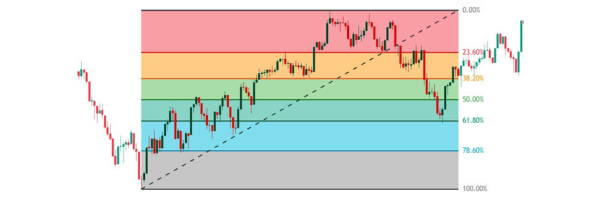
The “Map” of the market. It predicts exactly where a pullback will stop (e.g., 61.8%) so you can enter at a discount.
A drawing tool that uses horizontal lines to indicate areas of support or resistance at key Fibonacci levels (38.2%, 50%, 61.8%).
Performance Note: The 61.8% “Golden Ratio” is the strongest level. Combine this level with a previous Support zone for a high-probability entry.
We didn’t just pick popular names; we stress-tested them.
To ensure you download tools that actually work in live market conditions, we filtered over 50 indicators against four strict criteria. A tool only made this list if it passed all four checks:
Don’t download them all. Pick the one that fits your trading personality.
Choosing an indicator is like choosing a pair of shoes—what works for a marathon runner (Trend Trader) won’t work for a sprinter (Scalper).
If you see these warning signs, run the other way.
Stop downloading random files from forums. Go to the source.
The internet is full of “cracked” indicators that often contain malware or outdated code. The safest, most reliable place to find tools is the official MQL5 Market for MetaTrader 4.
Most people just look at the “Most Popular” list, but that’s where the expensive tools are. To find excellent Free or Underrated tools, you need to use the filters correctly.
Expert Insight: Don’t ignore the “New” tab. Developers often launch high-quality indicators for free to build their reputation before switching them to paid. Catch them early!
Setup takes less than 2 minutes. Follow this exact sequence.
Most traders fail here because they paste the file in the wrong folder (Program Files). You must use the “Data Folder” inside the software.
If the indicator doesn’t load, go to Tools > Options > Expert Advisors and check the box that says “Allow DLL imports”.
Enabling “Allow DLL imports” grants advanced custom tools the ability to execute external code (Dynamic Link Libraries).
Only check this box for trusted, verified indicators.
A malicious DLL can potentially access your system, steal sensitive information, or compromise your trading environment.
You are responsible for any security risks incurred by enabling this option.
The MACD (Moving Average Convergence Divergence) is widely considered the most powerful because it serves a dual purpose: it identifies the trend direction and the momentum strength.
No indicator is 100% accurate, but Fibonacci Retracements tend to offer high precision for entry levels. This is because they are based on mathematical ratios (like 61.8%) that institutional algorithms use, creating a self-fulfilling prophecy.
The definitive test is to use the Strategy Tester in MT4. Select the indicator, check “Visual Mode,” and slide the speed bar. Watch closely: if a signal arrow appears on a candle and then disappears as the price moves, it repaints.
No. Searching for a 100% win rate is a rookie mistake that leads to scams. Even professional hedge funds operate with win rates between 40% and 60%. The key is a positive Risk-to-Reward Ratio (e.g., winning $2 for every $1 risked).
Learn how a CDS account in Malaysia holds Bursa-listed securities, how direct and nominee accounts differ, and what documents and fees to expect.

Scale your SME with confidence. Here are the top 10 local accounting firms providing expert tax optimization and e-invoicing integration.

Explore 10 Malaysian mortgage brokers and financing providers based on their backgrounds, specialisations and suitability for different borrowers.